Data Export
UMIE exports records from any supported driver source (WordPress Core, WooCommerce, ACF, JetEngine, MetaBox) into file outputs.
How to Export
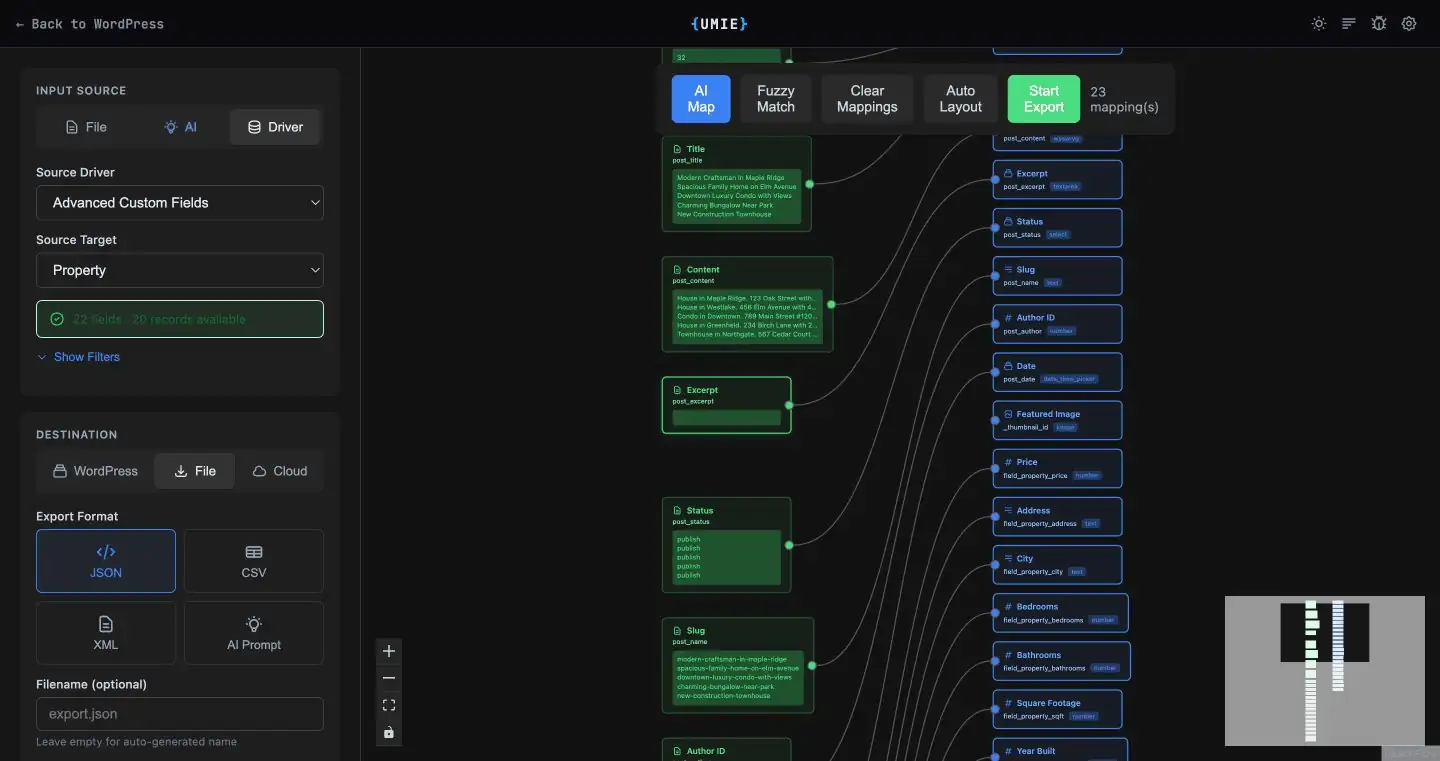
Section titled “How to Export”- Open WordPress Admin Sidebar > UMIE.
- Set Input Source to
Driver. - Set Destination to
File. - Select Source Driver and Source Target.
- (Optional) If a multilingual plugin is active, select a Source Language to export only posts in that language.
- Configure Filters (optional):
- Filter by date range.
- Filter by status (e.g., “publish”, “draft”).
- Filter by specific IDs.
- Select Format:
- JSON: Hierarchical data structure, best for developers and backups.
- CSV: Spreadsheet-compatible, flat structure (nested fields are flattened).
- XML: Standard XML structure.
- AI Prompt: Downloads
schema.json+prompt.txtfor AI-assisted content generation.
- Start Export.
Process & Performance
Section titled “Process & Performance”The export process runs in the background using a batch processing system. This ensures that:
- No Timeouts: Large datasets (10,000+ records) are exported in chunks.
- Memory Efficient: The server memory usage remains low.
You can navigate away from the page while the export runs. When finished, a Download button will appear.
Multiple Files
Section titled “Multiple Files”You can run export repeatedly with different filters, filenames, and formats to generate multiple files from the same source target.
Exported Data Structure
Section titled “Exported Data Structure”Returns a complete object representation of the data, including all meta fields and taxonomies.
[ { "id": 123, "title": "My Post", "meta": { "custom_field": "value" } }]Flattens nested structures using dot notation headers:
idtitlemeta.custom_field
Wraps data in a root <items> element with individual <item> records.
AI Prompt
Section titled “AI Prompt”Downloads two files:
schema.jsonwith selected fieldsprompt.txtfor generating import-ready records
Troubleshooting
Section titled “Troubleshooting”- Empty File: Check your filters. If no records match the criteria, the export file will be empty.
- Stuck Process: If the progress bar halts, check Tools > Scheduled Actions to see if the background worker is paused or failed.