Update Mode
Update Mode lets you update existing posts/CPT records in-place instead of creating new ones.
It is activated automatically when you choose the same driver and target for both:
- Source (input)
- Destination (output)
When to Use Update Mode
Section titled “When to Use Update Mode”- Refresh existing records from a source driver
- Apply AI Rewrite transformations to existing content
- Bulk-correct repeater/meta values without creating duplicates
How to Enable
Section titled “How to Enable”- Open WordPress Admin Sidebar > UMIE.
- Set Input Source to
Driver. - Set Destination to
WordPress. - In source selection, choose your driver and target.
- In destination selection, choose the same driver and target.
- UMIE switches operation type to Update existing records in-place.
What UMIE Does Automatically
Section titled “What UMIE Does Automatically”- Auto-maps matching fields 1:1 when schemas match
- Includes repeater sub-field metadata for correct nested updates
- Reuses normal mapping UI (Node View and Table View)
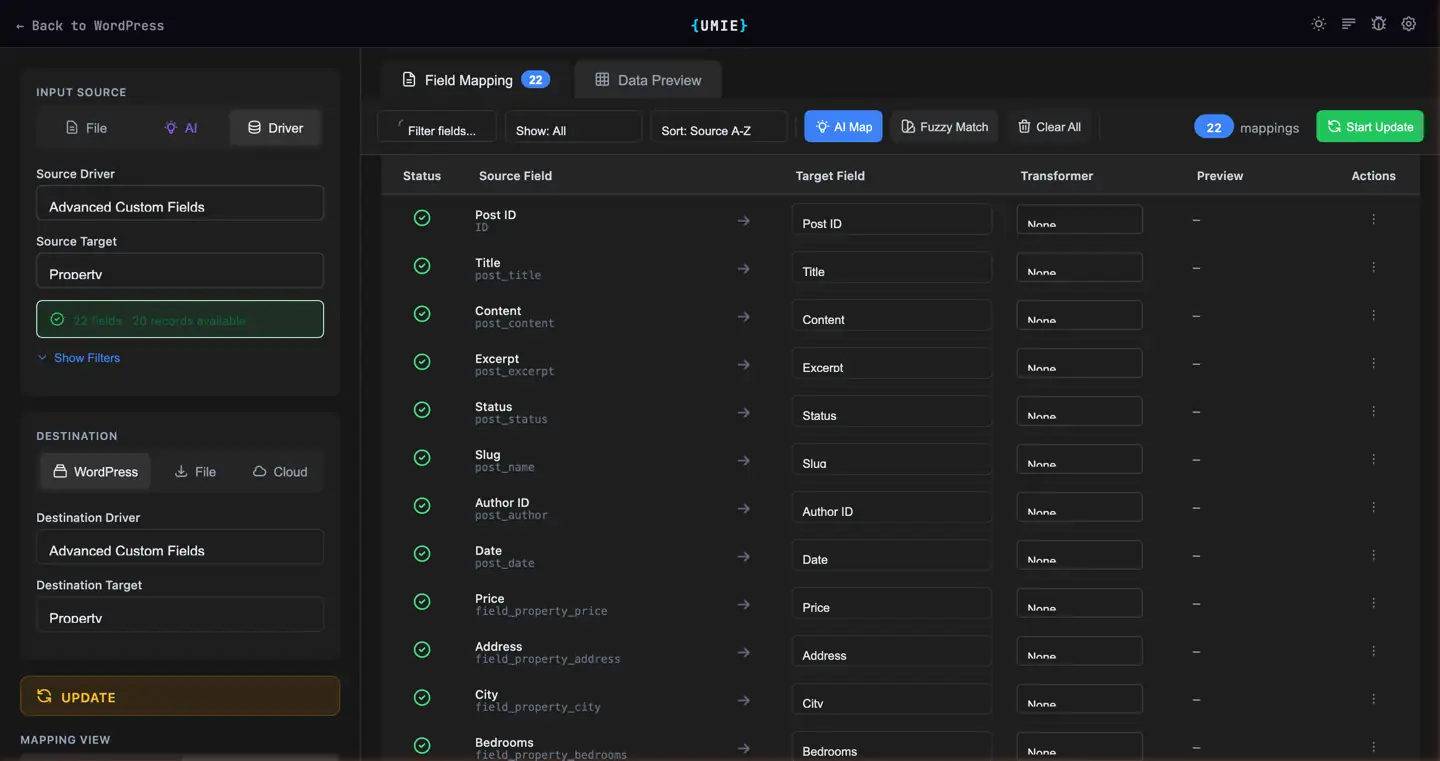
Table View Behavior in Update Mode
Section titled “Table View Behavior in Update Mode”Recent improvements in the plugin include:
- Correct target field and transformer display in Table View
- Data Preview showing original value and AI Rewrite transformed value side-by-side
- Skip messaging in AI Rewrite when source values are empty
- Source panel summary showing both field count and record count
- Run AI Rewrite preprocessing before starting the update job.
- Review Data Preview to verify transformed values before execution.
- If AI credits are unavailable, enable Fallback to Fuzzy Matching for mapping assistance.