Media Library AI
UMIE integrates directly into the WordPress Media Library, allowing you to generate accessibility-friendly alt text, titles, and captions for your images without leaving the dashboard.
Overview
Section titled “Overview”The Media Library integration adds a Generate Alt Text button to:
- The Media Library Grid View (in the attachment details modal).
- The Media Library List View.
- The Edit Media screen (when editing an individual attachment).
- The Add Media modal in the post editor.
This feature uses your UMIE AI credits to analyze the image and generate descriptive text.
Features
Section titled “Features”- Alt Text Generation: Create concise, descriptive alt text for accessibility and SEO.
- Title Generation: Automatically rename the attachment title based on the image content.
- Caption Generation: Create engaging captions for your images.
- Vision Mode: Analyze the visual content of the image for higher accuracy (supports analyzing objects, colors, and text within the image).
- Website Context: Uses your site’s specific context (configured in Settings) to generate relevant descriptions.
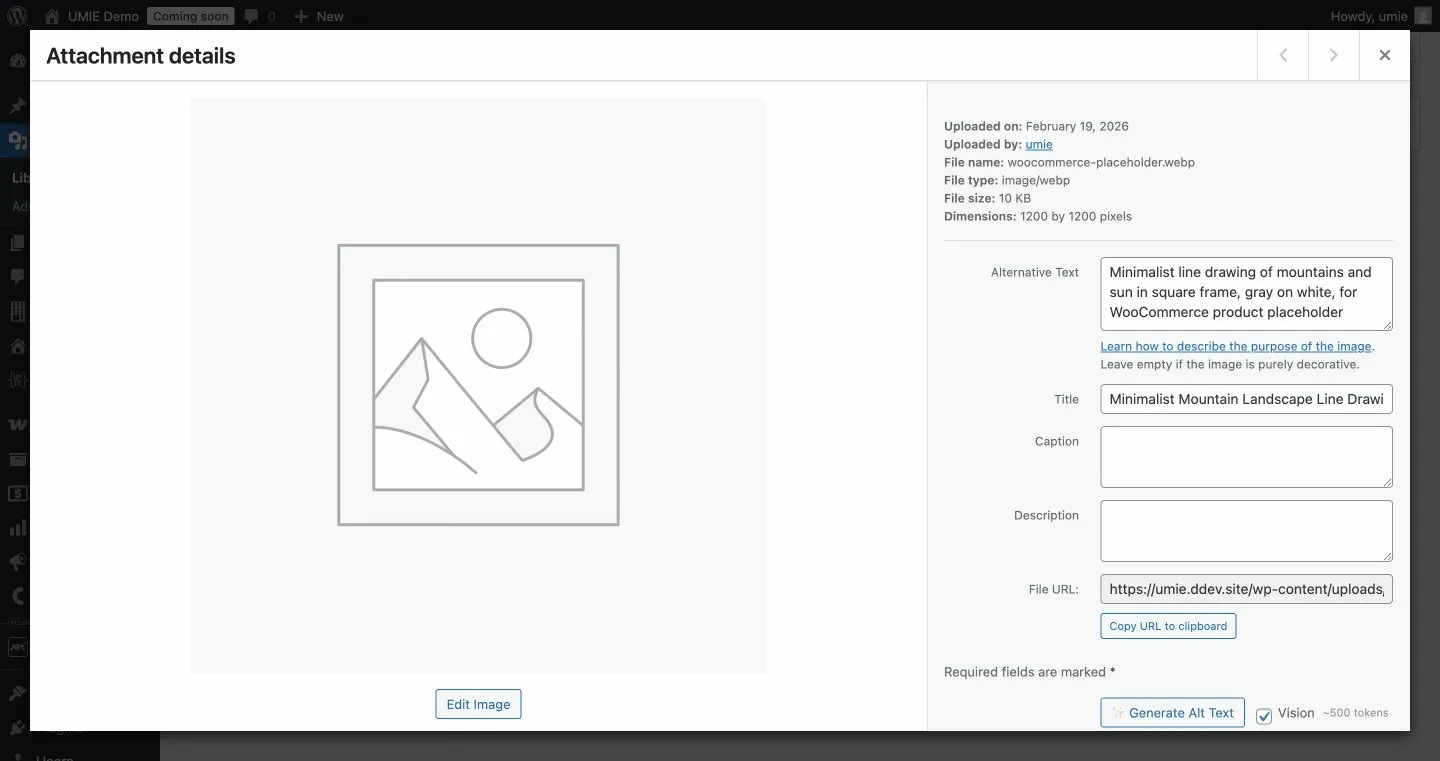
How to Use
Section titled “How to Use”- Navigate to Media > Library.
- Click on an image to open the details view (or click “Edit” in List View).
- Look for the Generate Alt Text button near the Alt Text field.
- Click the button to generate text.
Options Panel
Section titled “Options Panel”Next to the generate button, you’ll see:
- Vision Checkbox: Check this to enable Vision Mode.
- Unchecked (Text-only): Uses filename and metadata context.
- Checked (Vision): Also analyzes image pixels for richer results.
- Token Estimate: Shows the approximate cost for the operation.
Configuration
Section titled “Configuration”You can configure default behaviors in WordPress Admin Sidebar > UMIE > Settings under the AI Alt Text section.
| Setting | Description |
|---|---|
| Use Vision AI | Enable Vision Mode by default for all generations. |
| Generate Title | Automatically update the Image Title field when generating alt text. |
| Generate Caption | Automatically generate and fill the Caption field. |
| Overwrite Existing | If checked, the button will overwrite existing alt text without confirmation. If unchecked, you will be asked to confirm before overwriting. |
Improving Quality with Context
Section titled “Improving Quality with Context”To get the best results, ensure you have filled out the Website Context in WordPress Admin Sidebar > UMIE > Settings.
Example Context:
“Premium organic bakery specializing in sourdough breads and gluten-free pastries. Our brand voice is warm, rustic, and inviting.”
With this context, the AI will generate descriptions that align with your brand (e.g., describing a loaf of bread as “Artisan sourdough loaf with a crispy crust” rather than just “Bread”).
Token Usage
Section titled “Token Usage”Token usage varies by image complexity, selected options, and whether vision is enabled.
Note: You need an active UMIE license and sufficient AI credits to use this feature.