Data Migration
Migration moves data from one WordPress driver/target to another.
Use it when you are:
- Switching field ecosystems (for example ACF -> MetaBox/JetEngine)
- Moving content between post types
- Refactoring legacy structures into a cleaner schema
Local Migration (Same Site)
Section titled “Local Migration (Same Site)”- Open WordPress Admin Sidebar > UMIE.
- Set Input Source to
Driver. - Set Destination to
WordPress. - Select Source Driver + Source Target.
- Select Destination Driver + Destination Target.
- Review or adjust field mappings.
- Start migration.
The job runs in background batches.
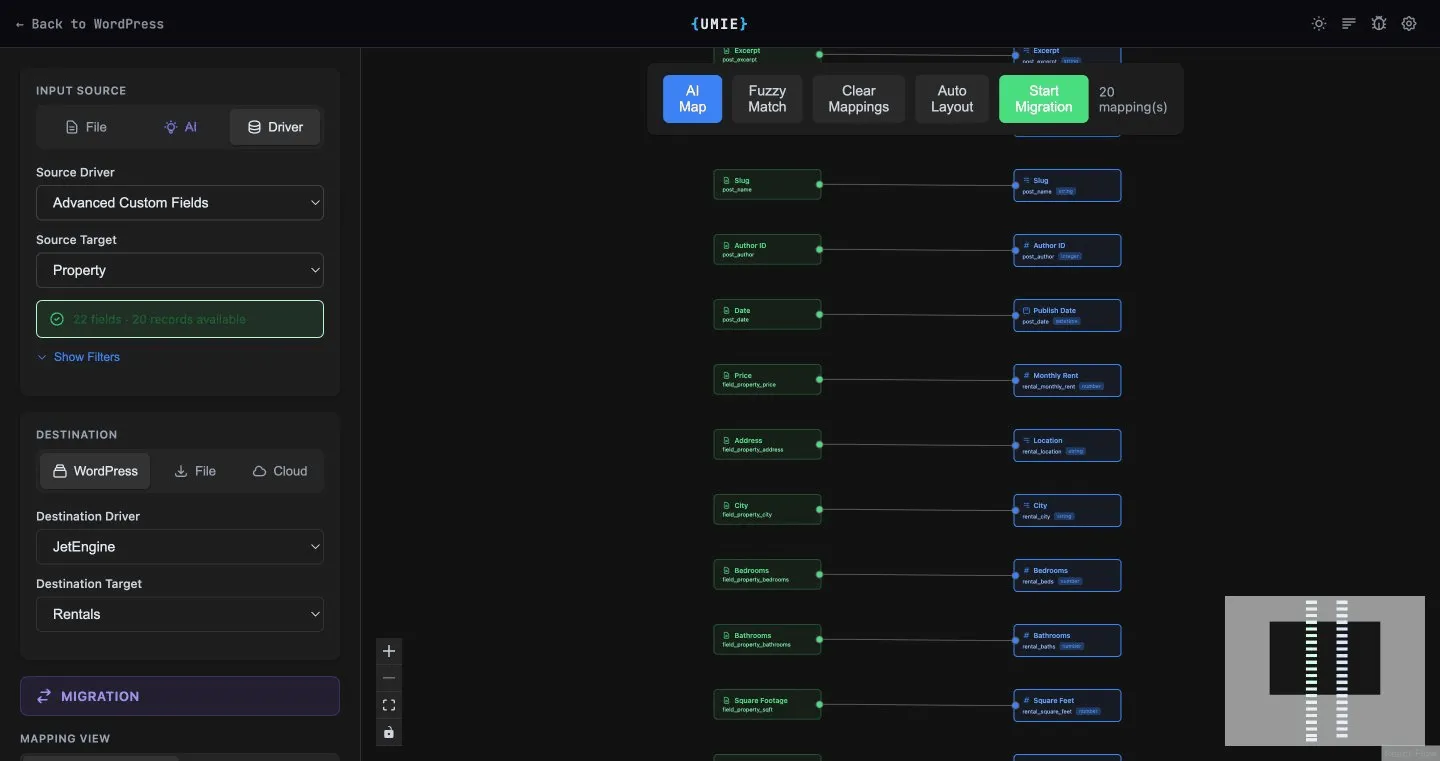
Migration vs Update
Section titled “Migration vs Update”- Migration: Source and destination differ (driver and/or target).
- Update: Source and destination are the same driver + same target (in-place update).
If you choose the same source/destination pair, UMIE switches to Update Mode.
Key Behaviors
Section titled “Key Behaviors”- Source records are treated as read-only during migration.
- Destination records are created/updated according to mapping rules.
- Rollback is available for migration jobs where supported.
- If a multilingual plugin is active, destination posts automatically inherit the source post’s language and translation group links are preserved.
Cloud Bridge (Cross-Site)
Section titled “Cloud Bridge (Cross-Site)”Cloud Bridge lets you push packages between WordPress sites on the same license.
Supported Source Types
Section titled “Supported Source Types”- Driver source (records read directly from a local driver/target)
- File/AI source (records loaded from uploaded file or AI extraction)
Cross-Site Flow
Section titled “Cross-Site Flow”- Prepare source records and mappings.
- Set Destination to
Cloud. - Select the target site (same license).
- Select remote driver and remote target.
- Load remote schema and finalize mappings.
- Push package.
- Target site auto-imports in background.
- You can include image sessions/media with the package.
- Progress is visible in Cloud Bridge push/package views.
- If auto-import is delayed, retry/background processing will pick it up.
Troubleshooting
Section titled “Troubleshooting”Target site not listed
Section titled “Target site not listed”- Confirm both sites are activated on the same license.
- Confirm the target site license is active.
Push disabled
Section titled “Push disabled”- Ensure source records are loaded.
- Ensure remote driver and remote target are selected.
- Ensure at least one mapping exists.
Auto-import not triggered yet
Section titled “Auto-import not triggered yet”- Confirm background processing is running on target site.
- Check firewall/security rules that might block callbacks.
- Retry after package status refresh.